Showing posts with label TWITTER. Show all posts

Thursday, 27 September 2012

ANIMATED TWITTER BUTTON(GIF) WIDGET v1

,

A great way to draw more attention to your Twitter feed and to get more people following your Twitter is by posting a “Follow Me On Twitter” button right by the feed.  I took the time to make up some free graphics for anyone that would like to use them. I supplied every version with a GIF with transparent background and a PNG with white background.


You can download the graphics by right clicking the image and downloading the link.  Just place the image on your site and link to your Twitter profile.

Make your website design more sociable with this twitter button design.

Enjoy!


Animated Twitter Button GIF with white background:


animated twitter button


Animated Twitter Button GIF with transparent background:


animated twitter button

Animated Twitter Button GIF with white background:


animated twitter button


Animated Twitter Button GIF with transparent background:


animated twitter button


Animated Twitter Button GIF with white background:


animated twitter button


Read more →

Friday, 7 September 2012

Wordpress Adapted Social Subscription Box For Blogger

,
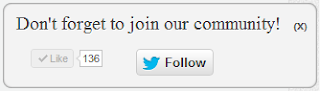
Hello Friends!! Today i will tell you how to add Wordpress Adapted Social Subscription Box For Blogger. This widget is adapted from wordpress and has your facebook fanpage like button and twitter follow button. The benefit of this widget is that your users can stay connected to you easily through your fanpage or twitter. This widget features slideout effect and appears when the user is at the bottom of the page.

Live Demo

To see Wordpress Adapted Social Subscription Box For Blogger Just Scroll Out to Bottom of this page. 


How to Add Wordpress Adapted Social Subscription Box For Blogger


  • Go to Blogger Dashboard > Layout > Add Gadget.
  • Then select HTML/Javascript and paste the below code in it

<script type="text/javascript" src="http://ajax.googleapis.com/ajax/libs/jquery/1.4.4/jquery.min.js"></script> &nbsp; <script type="text/javascript">$(window).scroll(function(){if($(document).scrollTop()>=$(document).height()/4)$("#IGsocialslide").show("slow");else $("#IGsocialslide").hide("slow");});function closeIGsocialslide(){$('#IGsocialslide').remove();$.ajax({type:"POST",url:"/facebookpage.php"});}</script> <link href="https://dl.dropbox.com/u/100213066/InfozGuide%20Wordpress%20Adapted%20Social%20Subscription%20Widget.css" rel="stylesheet" type="text/css" />   <div style="display: none;" id="IGsocialslide"> <a style="position:absolute;top:14px;right:10px;color:#555;font-size:10px;font-weight:bold;" href="javascript:void(0);" onclick="return closeIGsocialslide();">(X)</a> <span style="font-family: Tekton Pro; font-size: 20px; margin: 10px 0; text-shadow: 1px 1px 0 #FFFFFF;">Don't forget to join our community!</span><br />   <div style="float:left; margin:15px;"><iframe src="//www.facebook.com/plugins/like.php?href=https%3A%2F%2Fwww.facebook.com%2Fcoollokjeeth&send=false&layout=button_count&width=80&show_faces=false&action=like&colorscheme=light&font=arial&height=21" scrolling="no" frameborder="0" style="border:none; overflow:hidden; width:80px; height:21px;" allowtransparency="true"></iframe></div>   <div style="float:left; margin:15px;"><a href="https://twitter.com/coollokjeeth" class="twitter-follow-button" data-show-count="false" data-size="large" data-show-screen-name="false">Follow @coollokjeeth</a> <script>!function(d,s,id){var js,fjs=d.getElementsByTagName(s)[0];if(!d.getElementById(id)){js=d.createElement(s);js.id=id;js.src="//platform.twitter.com/widgets.js";fjs.parentNode.insertBefore(js,fjs);}}(document,"script","twitter-wjs");</script></div> </div>   <div class='clear'></div>


  • Note: 


Remember to change coollokjeeth with your own facebook page username.
Change coollokjeeth to your own Twitter Username twice in the above code.

Still have any problems or queries , use comment box below. 
  
(X)Don't forget to join our community!
Read more →